


Subscription Manager: Reko
4.210.00 Reviews
App Specs
- Version
- 3.0.11
- Updated On
- License
- Free
- Downloads
- 10,000+
- Developer
- Playground Studio LLC
- Categories
- Finance
- Platform
- Android
Screenshots

 Analysis by AppCompare
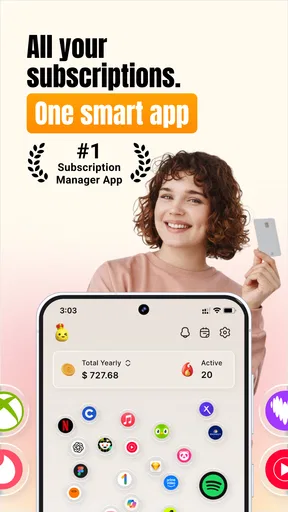
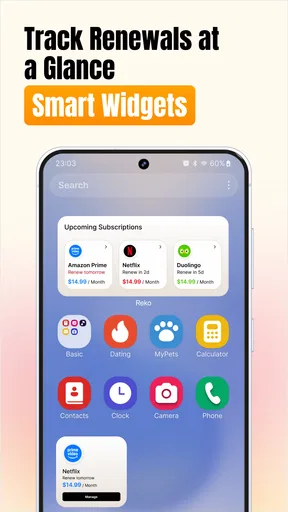
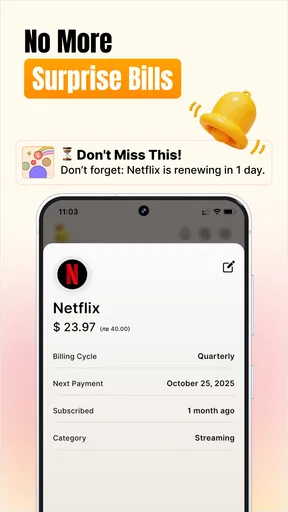
I started using Subscription Manager: Reko with a simple household problem in mind: several recurring charges were spread across different accounts, app stores, and trial periods, and nobody was completely sure who was paying for what. Reko is a finance app from Playground Studio LLC that focuses on finding subscriptions, tracking bills, watching renewal dates, and helping users cancel app subscriptions. That narrow focus makes it more useful than a general budgeting app when the main issue is recurring spending rather than every transaction in a bank account.
My first impression was that Reko is most valuable as a visibility tool. It does not need to replace a full banking app to be helpful. Instead, it gives the recurring part of a household budget its own place. That distinction matters: a person can be comfortable with their bank’s spending charts and still lose track of a free trial, an annual service, or an app subscription that renews quietly.
How Reko fits a shared household budget
A realistic use case is a couple or household where one person handles the streaming services, another pays for cloud storage, and a child or teenager has started a trial through an app store account. The total may not look alarming in any single month, but renewals can arrive at different times. Reko is designed around that scattered pattern, so I would use it as a shared conversation starter: what is active, what is still needed, and which payment belongs to which account?
The important boundary is that Reko should not be treated as a magical household account manager. I would not assume that one installation automatically sees every subscription belonging to other people. Each person still needs to be honest about the services they use and enter or review the relevant information within their own account context. That makes the app useful for coordination, but not a substitute for permission, account access, or a shared financial agreement.
For a household, I found the best approach is to begin with a short inventory rather than trying to record every expense immediately. List the recurring services that are easiest to forget, especially trials, annual plans, and subscriptions connected to less frequently used devices. Then separate personal services from household services. This prevents a common mistake: cancelling something that one person considers unnecessary while another quietly relies on it.
Reko’s free availability makes that initial test easy. The app is free to install, although it includes in-app purchases ranging from $4.49 to $8.99 per item. I would spend time with the basic workflow before paying for anything, particularly if the household only needs a simple reminder list. The value of an upgrade depends on whether the extra capabilities save enough attention and missed renewals to justify the cost.
Setting boundaries before adding subscriptions
Good setup is less about entering a huge number of services and more about deciding what the list means. I would create a consistent naming habit: use the service name, the person responsible for it, and the payment source in a note or description if the app allows that workflow. Even without a dedicated family feature, that small discipline makes a shared review much clearer.
Worth Reading Before You Choose

EA SPORTS FC Mobile 26 Is a Bigger Football Game, but It Takes Time

Flipboard Shows What News Apps Must Do Beyond the Feed

Switching to Android Auto Means Rethinking Your Driving Routine

Google Calendar Makes a Crowded Week Easier to Manage

Ludo King Makes the Most of the Minutes Between Plans

Baby Panda World Brings Quick Play to Modern Phones, but Its Game Library Feels Busy
I would also distinguish between a subscription that is active and one that is merely being considered. A trial should be treated as a decision with a deadline, not as a free service. When I add a trial to a tracking system, I make the cancellation date the important moment, because the real risk is forgetting what happens after the trial ends. This is one of the most practical ways to use Reko beyond simply viewing a list.
Another useful boundary is ownership. If a subscription is billed through one person’s account but used by several people, I would record it as a household cost while keeping the account holder clear. If it belongs entirely to one person, I would avoid presenting it as a shared saving opportunity. That distinction reduces arguments later and makes cancellation decisions more respectful.
Reko is also a better fit for deliberate checking than for people who expect every financial detail to appear without effort. A subscription tracker is only as reliable as the information it contains. I would compare the app’s list with bank or app-store billing records when setting it up, then revisit the list after changing phones, payment cards, or account settings. This extra check is especially important when several people use different stores or payment methods.
Coordinating renewals without creating confusion
The strongest household benefit is the chance to turn renewal dates into planned decisions. Instead of discovering a charge after it happens, I would review upcoming renewals during a regular monthly money check. The goal is not to cancel everything. It is to ask whether the service is still used, whether two services overlap, and whether the person paying still agrees to keep it active.
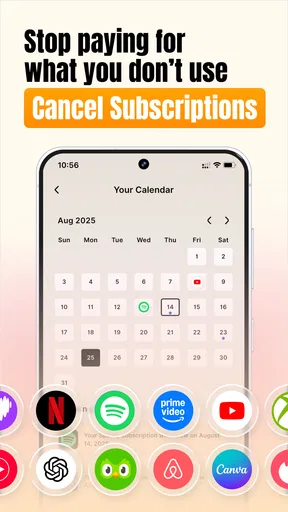
A useful workflow is to group decisions by action. One group contains subscriptions to keep, another contains services to review, and a third contains trials or plans that need cancellation before renewal. This is more effective than scrolling through a long list and hoping an important date stands out. Reko’s emphasis on renewals and trials supports that kind of practical routine.
For shared devices, I would keep the review visible to the adults responsible for payments rather than handing financial decisions to a child. A teenager can point out which app or service is useful, but the account holder should confirm the billing details and cancellation route. This keeps coordination transparent without pretending that every household member has the same authority.
There is also a subtle trade-off between convenience and privacy. A shared list can prevent duplicate subscriptions, but it may expose personal services that someone would rather keep private. I would only share information that the household genuinely needs for budgeting. Reko can support coordination, but the people using it still have to decide what should remain personal and what should be discussed collectively.
When a cancellation is needed, I would treat Reko as the place that tells me to act, not automatically as proof that the service has ended. The final cancellation may still need to happen through the relevant app store or service account. Afterward, I would check for a confirmation and update the tracker. That two-step habit avoids a particularly frustrating error: marking a subscription as cancelled while the billing account remains active.
Age, trust, and account responsibility
The app has an Everyone content rating, which makes it approachable in a mixed-age household. That does not mean every financial action should be open to every family member. Age suitability and financial authority are different questions. I would be comfortable showing a younger user how renewal tracking works, but I would keep payment decisions, account credentials, and cancellation confirmation with the responsible adult.
This matters because subscription problems often begin with confusion rather than bad intent. A child may believe that deleting an app ends the subscription, or a family member may assume that a shared login means shared billing control. Reko can help put the renewal information in front of everyone, but the household still needs a clear rule about who approves purchases and who confirms cancellations.
Trust also affects whether the app works well for couples or roommates. If everyone agrees to disclose recurring household charges, a central review can reveal duplicated storage plans, overlapping entertainment services, or trials nobody remembers starting. If people do not agree on what may be recorded, forcing everything into one list can create more tension than savings. In that situation, separate personal tracking with a small shared section may be the healthier arrangement.
I would not use Reko as a replacement for parental supervision, bank alerts, or the security controls offered by an app store. Its role is organization. That is still valuable, but keeping the role narrow prevents unrealistic expectations. The app can remind a household to investigate a renewal; it cannot decide whether a purchase was authorized or resolve an account dispute on its own.
What the app does well in everyday use
In my experience, the clearest strength is its focus. General finance apps often mix recurring bills with groceries, transfers, cash purchases, and one-time expenses. That broad view is useful for a complete budget, but it can bury the subscriptions that need a decision. Reko keeps attention on the charges that repeat, renew, or begin as trials.
That focus is particularly helpful after a busy month. I can imagine opening the app before a household budget meeting and asking three direct questions: which services renewed, which ones are approaching renewal, and which trials need action? Those questions are more useful than simply asking whether spending went up or down, because they lead to specific decisions.
The app also suits people who manage several digital services but do not want to build a spreadsheet. A spreadsheet can be flexible, yet it requires manual formatting, date sorting, and ongoing maintenance. Reko’s dedicated purpose should make the tracking process feel less like bookkeeping. For someone who wants a focused place to monitor subscriptions, that simplicity is a meaningful advantage.
Its public reception is encouraging without being a reason to skip personal testing: Reko holds a 4.2 average from 275 ratings and has passed 10K+ installs. I read those figures as signs that the concept is connecting with a real group of users, not as proof that it will match every household’s habits. Subscription management is personal; the right test is whether the app makes your own renewal routine easier.
The current version is 3.0.11, and the app was released on May 13, 2025. It supports Android 7.0 and later, which gives it broad compatibility with older devices. That is useful for households that keep an older phone as a shared or backup device, although I would still make sure the device is maintained and protected before using it for financial organization.
Where Reko may not be the right choice
Reko is not the best option for someone looking for a complete financial dashboard. If your priority is automatic bank reconciliation, detailed category budgets, investment tracking, or household accounting across all purchases, a broader personal finance app may be a better fit. Reko’s narrower purpose is its advantage for subscription clutter, but it is also the reason it should not be mistaken for a full money manager.
It may also disappoint users who want effortless discovery across every account. Household subscriptions are often split between different app-store profiles, email addresses, payment cards, and service logins. A focused tracker can organize what you identify, but it does not remove the need to check those separate sources. I would skip it if I knew I would never maintain the list after the first setup.
Another limitation is the shared-device question. A family using one tablet may be tempted to treat the app as a single communal record, but that can blur who owns a subscription and who is allowed to cancel it. Reko can be part of the conversation, yet it does not eliminate the need for account boundaries. If your household needs formal roles, approval workflows, or dedicated family controls, you should look for a service built specifically around those requirements.
The in-app purchase model is another point to consider. The free entry point is helpful, but paid items between $4.49 and $8.99 mean that the overall value depends on what you need beyond the basic experience. I would not pay simply because the household list feels untidy. First, measure whether the app helps prevent missed renewals or makes monthly reviews faster. If it does not change behavior, a carefully maintained note may be enough.
My household verdict
I recommend Reko to people who repeatedly lose track of trials, recurring app charges, and renewal dates, especially when several services are spread across a household. I like that it treats subscriptions as a separate financial problem instead of forcing them into a much larger budgeting system. Used consistently, it can turn vague concern about “too many subscriptions” into a manageable list of decisions.
My recommendation comes with a clear condition: use it as a coordination layer, not as the authority over every account. Decide who owns each subscription, keep personal information within sensible boundaries, and confirm cancellations at the original billing source. Those habits make the app more dependable and prevent the most common misunderstanding around subscription trackers.
For a shared household, I would begin with trials and expensive annual services, then add ordinary monthly plans once the routine feels comfortable. I would review the list at the same time each month and use the renewal dates to start conversations before charges arrive. That workflow gives Reko a practical role without requiring everyone to hand over complete financial visibility.
Overall, Playground Studio LLC has made a focused finance app for a very specific modern nuisance: recurring digital payments that are easy to start and easy to forget. It is free to try, suitable for Everyone, and compatible with Android 7.0 and newer devices. My main advice is to use Reko as a reminder and decision tool, while keeping account control and final cancellation checks with the actual bill owner. For users who want that focused help, it is a sensible addition to a household money routine; for users seeking full banking automation or formal family permissions, a broader alternative will likely serve them better.
Pros
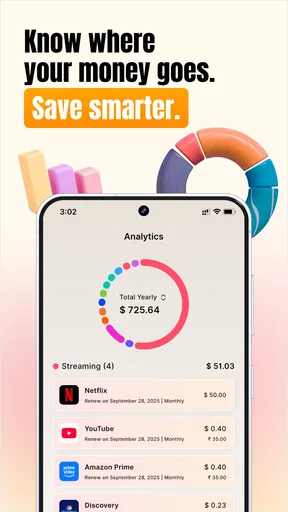
- Tracks recurring payments in one organized dashboard.
- Supports custom billing cycles beyond monthly subscriptions.
- Helps identify upcoming charges before they reach your account.
- Simple interface makes adding a subscription quick.
- Useful reminders can reduce missed renewals and late cancellations.
Cons
- Manual entry can be time-consuming for users with many subscriptions.
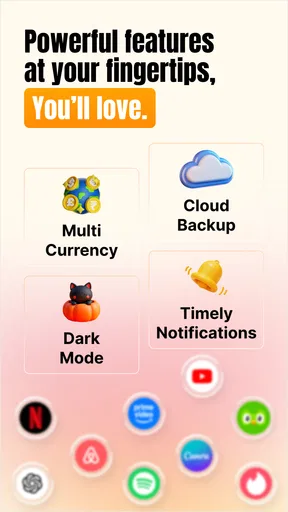
- Some advanced features may require a paid plan.
- No guarantee that every regional service is supported.
- Reminder accuracy depends on entering correct billing dates.
- Limited value if you rarely use subscription-based services.
FAQs for Subscription Manager: Reko
What is Subscription Manager: Reko used for?
Subscription Manager: Reko is designed to help you organize and monitor recurring payments in one place. You can add services such as streaming platforms, cloud storage, software plans, memberships, and other subscriptions, then review their prices, billing cycles, and renewal dates. This makes it easier to understand where your money is going and avoid forgetting upcoming charges.
Does Subscription Manager: Reko automatically detect my subscriptions and payments?
The app’s main purpose is subscription tracking, but users should not assume that every recurring payment will be detected automatically. Depending on the version, platform, and permissions available, you may need to enter subscriptions manually or confirm imported information. Before relying on the app for reminders, check that each service has the correct price, billing frequency, renewal date, and currency.
Can Subscription Manager: Reko remind me before a subscription renews?
Yes, Subscription Manager: Reko is intended to help users keep track of upcoming renewals and receive reminders before recurring charges are made. Notifications are only useful when they are enabled and the subscription details are accurate, so review the app’s notification permissions and reminder settings after installation. It is also wise to verify that battery-saving features are not preventing alerts.
Is Subscription Manager: Reko free to download and use?
The app may be available to download without an upfront charge, but some features can depend on the current pricing model, optional purchases, or premium access. Availability of functions such as unlimited entries, advanced statistics, synchronization, or customization may vary by platform and version. Check the Google Play Store or Apple App Store listing carefully before subscribing to any paid plan.
Does Subscription Manager: Reko cancel subscriptions for me?
Subscription Manager: Reko should be treated primarily as a tracking and reminder tool, not as a universal cancellation service. Recording a subscription or receiving a renewal alert does not automatically stop billing. To cancel a plan, you generally need to use the provider’s website, app, account settings, or the subscription-management section of Google Play or the App Store, depending on where you originally subscribed.


